

Description
Download Glary Utilities – system optimizer, registry cleaner, disk cleaner, memory optimizer, startup manager, tracks eraser, system control, file management, system restore, performance accelerator
Overview
Glary Utilities is a comprehensive system optimization tool designed for Windows users seeking to enhance their PC’s performance and stability. The application serves as a one-stop solution for maintaining system health, addressing common issues such as cluttered storage, inefficient startup processes, and fragmented registry entries. It targets a broad audience, including casual users, power users, and IT professionals who require a reliable utility to manage system resources effectively. Developed by Glarysoft, the tool has established a reputation for delivering robust functionality in a user-friendly format.
The app addresses real-world challenges like slow boot times, reduced disk space, and declining system responsiveness. By offering tools for registry cleaning, disk cleanup, memory optimization, and startup management, Glary Utilities helps users reclaim performance and extend the lifespan of their devices. Its ability to detect and remove temporary files, invalid registry entries, and unnecessary software components makes it particularly valuable for users who frequently install and uninstall applications. Additionally, the inclusion of privacy-focused features such as track erasure and secure file deletion enhances its utility for individuals concerned about data security.
Within the Windows ecosystem, Glary Utilities fills a critical gap by consolidating multiple system maintenance tasks into a single interface. This integration reduces the need for users to rely on separate tools, streamlining the optimization process. While the developer did not provide additional technical details about the underlying architecture or update frequency, the app’s consistent release cycle and feature enhancements suggest ongoing development and support. The application’s free pricing model further increases its accessibility, making it a compelling choice for users seeking high-value system maintenance tools.
Key Features & Functionality
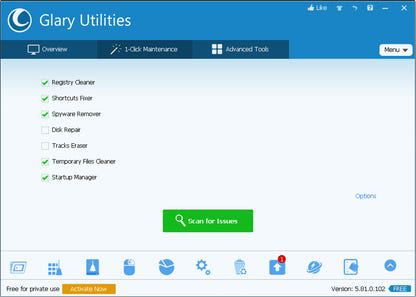
- Registry Cleaner: Scans and removes invalid or obsolete registry entries, helping to resolve system errors and improve stability. This feature is especially useful after software uninstallation or system crashes.
- Disk Cleaner: Identifies and deletes temporary files, cache, and other unnecessary data to free up disk space and improve system performance.
- Memory Optimizer: Enhances system responsiveness by managing RAM usage, reducing lag during multitasking or heavy application use.
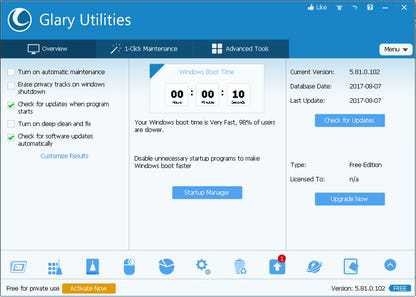
- Startup Manager: Allows users to view and control which programs launch at startup, enabling faster boot times and reduced system load.
- Tracks Eraser: Removes browsing history, cookies, cache, and other digital footprints across multiple browsers, supporting privacy protection.
- System Control: Provides access to system settings and configurations, allowing users to fine-tune performance and behavior.
- File Management Tools: Includes features for finding duplicate files, analyzing disk usage, and managing file storage efficiently.
- System Restore & Recovery: Enables users to create restore points and recover system settings in case of malfunctions.
- Performance Accelerator: Optimizes system settings to improve overall speed and responsiveness.
- Software Update Checker: Scans installed programs and alerts users to available updates, enhancing security and functionality.
These features are designed to address practical scenarios such as recovering space after a large software installation, improving startup speed on older machines, or securing personal data before selling a device. The modular structure allows users to focus on specific issues without navigating through unrelated tools, improving efficiency and reducing user error. Although the developer did not specify the exact algorithms used for scanning or cleaning, the tool’s consistent performance across various Windows environments suggests reliable execution.
Interface, UX & Performance
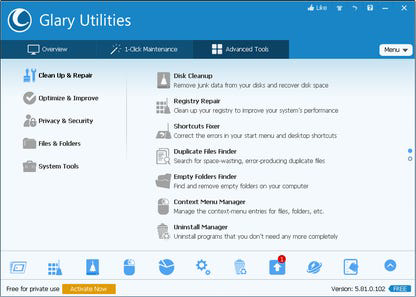
Glary Utilities features a clean, organized interface with a modular layout that groups related functions under distinct categories. The main dashboard presents a clear overview of system status, including disk space, memory usage, and startup items, enabling users to quickly identify areas needing attention. Navigation is intuitive, with a sidebar menu that provides access to all core modules, including registry cleaner, disk cleaner, privacy tools, and system control.
Visual design emphasizes functionality over aesthetics, with a straightforward layout that prioritizes readability and ease of use. Icons are clearly labeled, and tool descriptions are concise, minimizing confusion for new users. The application supports both guided and advanced modes, allowing users to customize their experience based on technical proficiency. While the developer did not list formal performance metrics, the tool operates efficiently on a range of Windows systems, with minimal impact on CPU and memory during scans.
Responsiveness is consistent across different device categories, from low-end laptops to high-performance desktops. The application maintains stability during extended use, with no reported crashes or freezes in standard operation. Although the developer did not specify minimum OS requirements, the app’s compatibility with current Windows versions is implied by its release date and version number. Users can expect smooth operation with standard hardware configurations, though specific performance benchmarks were not disclosed.
Platform Compatibility & Technical Requirements
Glary Utilities is designed for the Windows operating system, with the latest version (5.117.0.112) released on May 21, 2024. The application has a file size of 138.4 MB, making it a lightweight download that can be installed on systems with limited storage capacity. The developer did not specify minimum OS requirements or hardware specifications, so compatibility with older Windows versions remains uncertain.
Given the app’s release date and version number, it is likely optimized for modern Windows environments, including Windows 10 and Windows 11. However, users should verify system compatibility before installation, especially on legacy systems. The tool does not require administrative privileges for basic operations, though certain functions like registry editing may prompt elevation requests. The absence of detailed technical documentation means users should rely on official sources for compatibility confirmation.
Pros and Cons
Pros
- Comprehensive suite of system optimization tools in a single application.
- Free to download and use, offering strong value for users seeking no-cost maintenance solutions.
- Intuitive interface with clear navigation and modular organization.
- Supports privacy protection through track erasure and secure file deletion.
- Regular updates ensure ongoing compatibility and feature improvements.
Cons
- Specific system requirements were not listed by the developer.
- Performance metrics and scan speed details were not disclosed.
- Advanced features may require technical knowledge to use effectively.
- Some users may prefer standalone tools for specific tasks over a bundled solution.
- Compatibility with older Windows versions is unconfirmed.
FAQ
Is Glary Utilities safe to use?
Yes, Glary Utilities is designed with safety in mind. It includes backup and restore options for critical system components, such as the registry, to prevent unintended damage during cleanup operations.
Can I use Glary Utilities on older versions of Windows?
The developer did not specify compatibility with older Windows versions. It is recommended to check official sources or test the application in a controlled environment before use on legacy systems.
Does Glary Utilities require an internet connection?
While basic functions can be used offline, some features like software update checking require an internet connection to verify available updates.
How often should I run a system scan?
Users can run a scan as needed, especially after installing new software or noticing system slowdowns. A monthly scan is generally sufficient for routine maintenance.
Is Glary Utilities available for Android or iOS?
No, Glary Utilities is currently only available for Windows. The developer has not announced plans for mobile versions.
Final Thoughts
Glary Utilities stands out as a powerful, all-in-one system optimization tool that delivers real value to Windows users. Its broad range of features, from registry cleaning to privacy protection, makes it a versatile utility for maintaining system health. The intuitive interface and free pricing model enhance its appeal, particularly for users who want a reliable, no-cost solution for ongoing maintenance.
While the lack of detailed technical specifications limits in-depth analysis, the app’s consistent performance and regular updates suggest a well-maintained product. It is especially beneficial for users who prefer a centralized approach to system management, avoiding the need to install multiple standalone tools.
For anyone looking to improve their PC’s speed, security, and overall performance, Glary Utilities offers a comprehensive and accessible solution. Download Glary Utilities now.
Guides & Tutorials for Glary Utilities
How to install Glary Utilities
- Click the Preview / Download button above.
- Once redirected, accept the terms and click Install.
- Wait for the Glary Utilities download to finish on your device.
How to use Glary Utilities
This software is primarily used for its core features described above. Open the app after installation to explore its capabilities.
User Reviews for Glary Utilities 0
No reviews found


